
Download Skinzy Skin Editor – Roblox Avatar Customization Tool, 3D Preview, Skin Designer, PC Software, Desktop Application
Overview
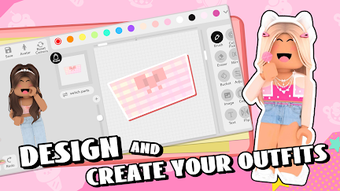
Skinzy Skin Editor is a specialized desktop application developed for Roblox users seeking advanced customization options for their avatars. Designed with creativity in mind, the software enables users to modify and design avatar skins with precision and ease. Its primary purpose is to empower players to craft unique visual identities within the Roblox ecosystem, offering a level of detail and control not available through the platform’s native tools. The application is ideal for both casual users exploring self-expression and more experienced creators aiming to produce high-quality, personalized designs.
By integrating a 3D preview system, Skinzy allows users to visualize their creations in real time, ensuring accurate alignment and proportion before finalizing changes. This feature enhances the design workflow by minimizing errors and streamlining the iteration process. The software is particularly useful for those who want to create custom outfits, accessories, or themed avatars for gaming, social interaction, or content creation. While the developer, Skinzy, has not provided additional background on their development history or team, the tool’s focused functionality suggests a targeted approach to enhancing the Roblox experience.
Key Features & Capabilities
- Advanced Crop Tool – Offers precise control over skin pattern placement, enabling users to adjust and reposition design elements with pixel-level accuracy.
- Real-Time 3D Preview – Provides an interactive 3D view of the avatar, allowing users to rotate, zoom, and inspect their design from all angles before exporting.
- Intuitive Editing Interface – Features a user-friendly layout with accessible tools, making skin editing approachable for beginners and efficient for experienced users.
- Direct Export to Roblox – Enables seamless saving and application of edited skins directly within the Roblox platform, reducing workflow friction.
- Design Pattern Customization – Supports the modification of existing skin templates or the creation of entirely new designs from scratch.
These features are especially beneficial for users creating themed avatars for events, game jams, or personal branding. The crop tool, for instance, can be used to align logos or textures perfectly on limbs and torso, while the 3D preview ensures that visual elements remain consistent across different body orientations. The ability to save and deploy designs directly into Roblox enhances the practicality of the tool, eliminating the need for third-party platforms or manual uploads.
User Interface, Workflow & Performance
The user interface of Skinzy Skin Editor is structured around a clean, functional layout optimized for creative tasks. Navigation is handled through a central workspace, with tool panels, preview windows, and property controls arranged for intuitive access. Users can switch between editing modes and view different parts of the avatar with minimal clicks, contributing to a smooth and efficient workflow.
While the developer did not specify resource usage details, the software’s 250 MB installation size suggests a lightweight footprint, which may contribute to stable performance on modern systems. General software behavior patterns indicate that the application likely maintains responsive interaction during editing tasks, especially given the real-time 3D preview functionality. However, exact performance metrics such as CPU or RAM usage were not provided. Stability during extended editing sessions was not detailed, but the inclusion of a preview system implies a focus on consistent rendering and user feedback. Users can expect a responsive experience during standard operations, though performance may vary based on hardware configurations.
Compatibility & System Requirements
Skinzy Skin Editor is available for both Windows and Mac operating systems, making it accessible to a broad user base across desktop platforms. The software is currently released in version 1.5.2, with a file size of 250 MB, indicating a compact installation package. This size suggests the application prioritizes efficient delivery without sacrificing core functionality.
Exact system requirements were not listed by the developer. Compatibility information is limited to the supported platforms, with no mention of minimum processor speed, RAM, or GPU specifications. As such, users are advised to ensure their system meets general standards for running modern desktop applications. The developer did not provide additional details regarding hardware dependencies or compatibility with older OS versions. Installation and operation appear to be straightforward, though users should verify their system’s capability to support the software’s graphical demands, particularly during 3D rendering.
Pros and Cons
Pros
- Specialized for Roblox avatar skin editing with targeted functionality
- Real-time 3D preview enhances design accuracy and visual feedback
- Intuitive interface suitable for users of all experience levels
- Direct export capability streamlines the workflow to Roblox
- Advanced crop tool supports precise pattern alignment
Cons
- System requirements not clearly defined
- No information on update frequency or support lifecycle
- Price point may be a barrier for casual users
- Limited to Roblox-specific use case, reducing cross-platform utility
- Developer background not disclosed
FAQ Section
Is Skinzy Skin Editor compatible with all Roblox avatars?
The software is designed specifically for Roblox avatars, but compatibility with all avatar types has not been confirmed. Users should ensure their avatar model is supported by the application’s current framework.
Can I use Skinzy offline after installation?
Yes, the software operates as a standalone desktop application, allowing full functionality without an internet connection after installation.
Is the software secure to download and install?
While no security vulnerabilities were reported, users should only download the software from official sources to ensure authenticity and avoid potential risks.
How often are updates released?
The update schedule was not specified by the developer. Users are encouraged to check the official website for the latest version and patches.
What type of license does Skinzy Skin Editor use?
The software is sold as a one-time purchase with a price of $14.99. The license terms were not detailed in the provided information.
Final Thoughts + CTA
Skinzy Skin Editor stands out as a focused, powerful tool for Roblox users who value creative control over their avatars. With its 3D preview, precise editing tools, and direct export functionality, it delivers a polished experience tailored to the needs of both casual and advanced creators. While some details like system requirements and update frequency remain unclear, the software’s core features are well-executed and purpose-built. The intuitive interface ensures accessibility, and the ability to see designs in real time significantly improves the customization process. For anyone looking to elevate their Roblox presence through unique, high-quality skins, Skinzy offers a compelling solution.
Download Skinzy Skin Editor now to begin crafting your personalized avatar experience.





.png)

